Online preview of training data shards and Hugging Face datasets
[2025 Dec update: added Zenodo data online preview feature]
I recently switched from WebDataset to LitData. LitData is developed by the same company behind PyTorch Lightning; I tried it when it was first released, but gave up due to many bugs. After more than a year of iteration, it has become very powerful. Moreover, it is decoupled from the PyTorch Lightning framework, so it can be used independently in any training/inference pipeline. It supports reading multiple shard formats: LitData, HF Parquet, MosaicML, and you can also stream directly from raw data via <code>StreamingRawDataset</code>.
Compared with WebDataset’s tar shard files, LitData’s drawback is that the generated bin shards (sometimes still zstd‑compressed) have poor readability and cannot be inspected directly like tar files. These <code>.bin</code> files have a complete internal structure but no filenames or directory concepts, and there is no ready‑made CLI to glance at the data. When debugging data preprocessing, tracking label errors, or inspecting the actual image/audio of a sample, this “invisible” feeling severely hurts efficiency.
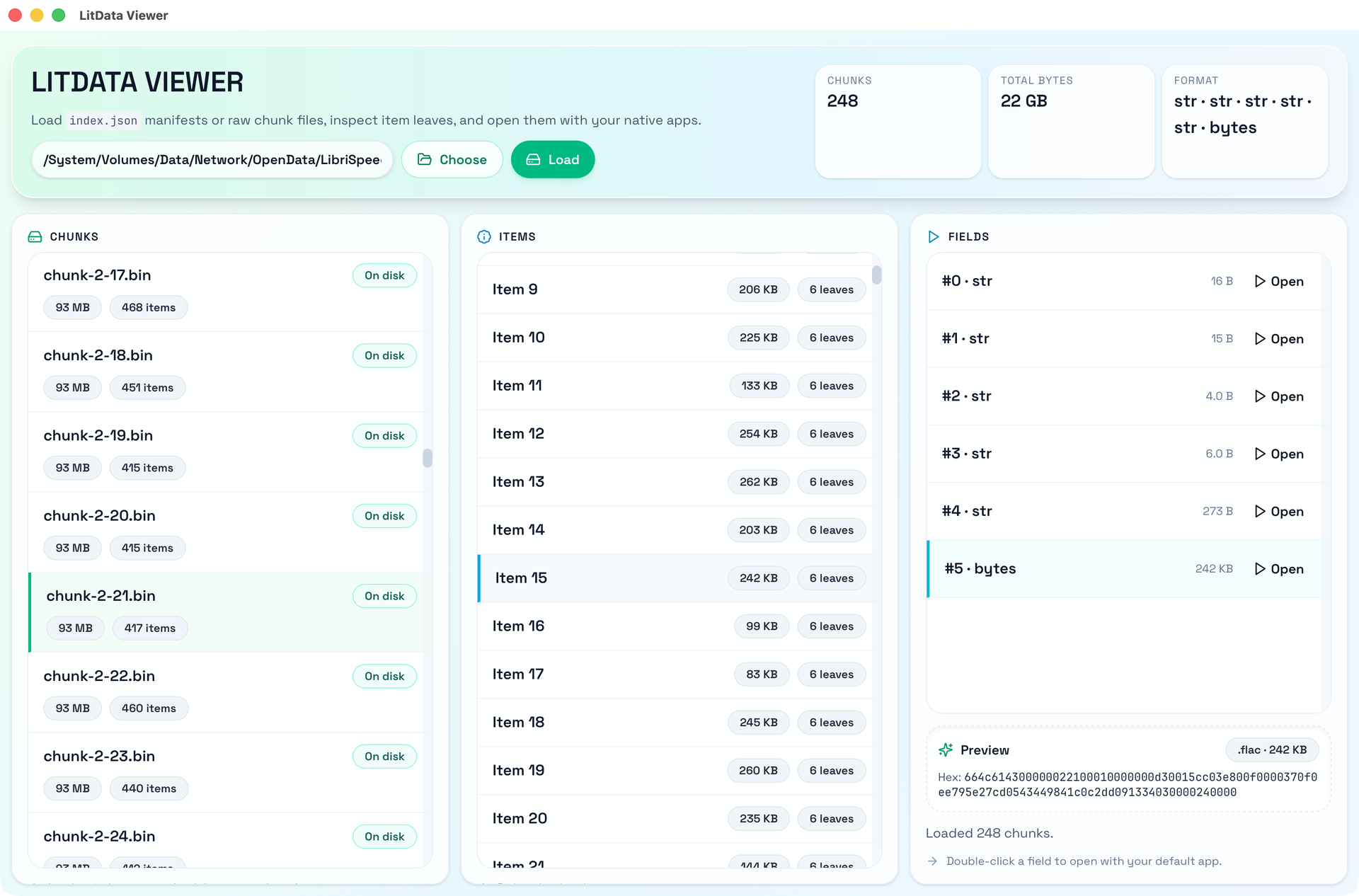
I open‑sourced a tool Dataset Inspector, a desktop application specifically for viewing training data shards.
LitData 的分片结构
Below is an introduction to LitData’s shard format and how Inspector reads these data.
index.json 文件
index.json is LitData’s core configuration file; it contains:
Data configuration (config)
compression: compression method, usuallynullorzstdchunk_size: how many records each shard file containschunk_bytes: target size of each shard filedata_format: array describing which fields each record hasdata_spec: description of the meaning of each field
Shard list (chunks), each shard includes:
filename: file name (e.g.,<code>0.bin</code>)chunk_bytes: file sizechunk_size: number of records it containsdim: tensor dimension information (used in some scenarios)
.bin 文件的内部结构
An uncompressed LitData shard file has the following structure:
u32 num_items                           // number of data items N
u32 offsets[num_items + 1]              // N+1 position infos

// Each data i (0 to N-1):
u32 field_sizes[字段数量]                 // size of each field
u8  字段_0[field_sizes[0]]
u8  字段_1[field_sizes[1]]
...
u8  字段_k[field_sizes[k-1]]
If the file is compressed with zstd, the suffix is .bin.zst and the entire file is compressed. It cannot be jumped to directly, so Inspector’s approach is: the first time the file is opened, the whole file is decompressed into memory and cached. All subsequent operations are performed in memory; if the file is not compressed, it can jump to any position without loading the entire file into memory.
判断文件类型和打开方式
To let Inspector open data inside a <code>.bin</code> file directly—e.g., opening a <code>.wav</code> with Adobe Audition—I added automatic file‑type detection and, based on the detected type, use the system’s default program to open it.
文件类型识别
First, determine how many fields each record has from data_format, then infer the file extension:
- Common types map directly:
<code>png → .png</code>,<code>jpeg/jpg → .jpg</code>,<code>str/string → .txt</code>, etc. - Complex format parsing:
<code>some.custom.ext</code>takes the last segment. - Check file‑content signatures: when
data_formatis<code>bytes</code>or<code>bin</code>, detect header signatures (e.g., RIFF, WAVE, ID3, fLaC) or parse text to determine the actual type.
通过默认程序打开
After selecting a field, you can view its content in the preview area; double‑clicking the field automatically creates a temporary file saved in <code>/tmp</code> and opens it with the system’s default application.
My open‑source project: github.com/binbinsh/dataset-inspector